
Reporting an increase in social insurance (SI) participants is one of the procedures a business must carry out as soon as it takes on an employee who is subject to compulsory social insurance. Correct and complete declaration not only helps employees receive insurance benefits in a timely manner but also avoids unnecessary penalty risks. Below is a detailed guide to the procedure for reporting an increase in social insurance participants on the Public Service Portal, updated for 2026.
In Which Cases Must a Business Report an Increase in SI Participants?
A business carries out the SI increase reporting procedure when it takes on an employee who is subject to compulsory social insurance under the regulations, including common cases such as:
- The business signs a labor contract with an employee;
- An employee returns to work after a period of unpaid leave of 14 days or more, or after suspending their labor contract.
- An employee returns to work after maternity leave or sick leave.
- An employee transfers from another unit to work at the business.
- Other cases that give rise to an SI participation obligation under current regulations.
What Is the Deadline for Reporting an SI Increase?
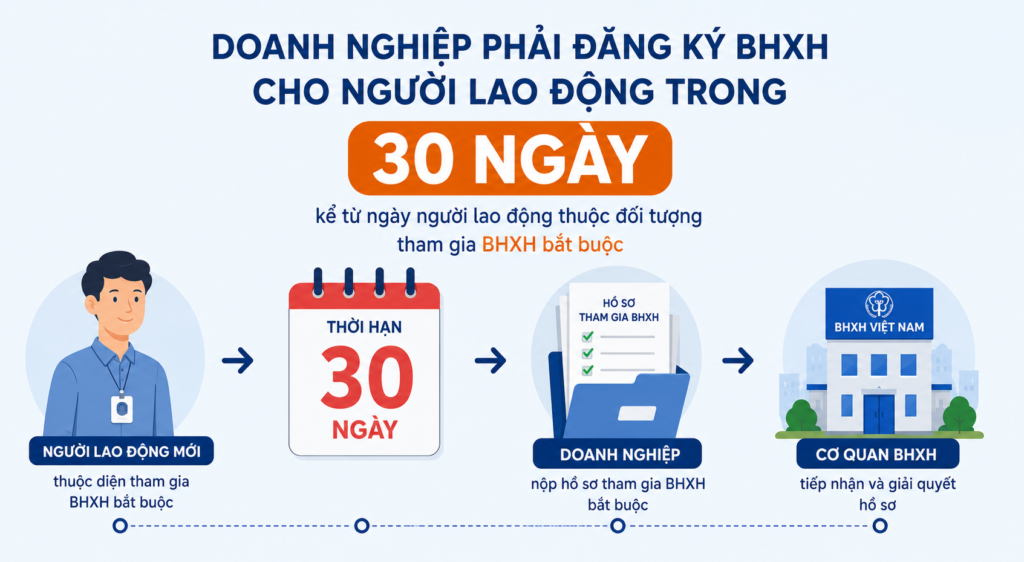
Pursuant to Clause 1, Article 28 of the Law on Social Insurance 2024, within 30 days from the date the employee becomes subject to compulsory social insurance, the employer must submit the dossier to the social insurance authority.
What Is the Current Social Insurance Contribution Rate?
Article 32 of the Law on Social Insurance 2024 provides that:
The compulsory social insurance contribution rate includes:
- 3% of the salary used as the basis for social insurance contributions, paid into the sickness and maternity fund;
- 22% of the salary used as the basis for social insurance contributions, paid into the retirement and survivorship fund.
The voluntary social insurance contribution rate equals 22% of the income used as the basis for social insurance contributions, paid into the retirement and survivorship fund.
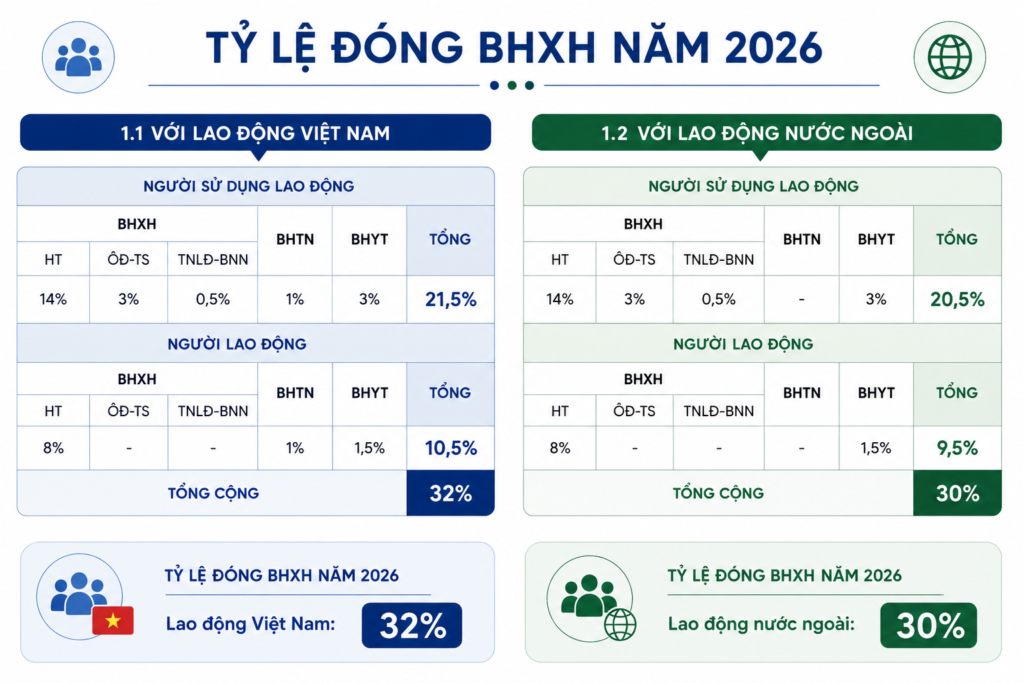
The specific contribution levels for some common cases are as follows:
Information to Prepare
Information to collect from the employee:
- Citizen ID card / Passport.
- Residence information: Hometown and contact address.
- Social insurance number: Look it up on the VssID app or on the Vietnam Social Insurance Portal.
- Phone number: Belonging to the employee and already verified.
- Initial place of medical examination and treatment: Choose a suitable hospital/clinic from the licensed list.
Information related to the contract and contribution level:
- Start date of work: The basis for reporting the increase within the month,
- Type of labor contract: Probationary contract, fixed-term contract, or indefinite-term contract.
- Salary level and social insurance contribution rate
- Job title/position
Forms to Prepare
Perform the operations on the declaration software or the Public Service Portal
- Participation Declaration (Form TK1-TS): Used for a new employee who does not yet have a social insurance number or needs to adjust their information.
- Unit Declaration (Form D01-TS): For the company (declared only if the company reports an increase for the first time or there are changes to the unit’s information).
- List of Employees (Form D02-TS): A detailed listing of all newly added personnel.
Where to Submit the Dossier
The business submits the electronic declaration through the Social Insurance Public Service Portal or other social insurance declaration software.
Detailed Guide to Reporting an SI Increase on the Public Service Portal (Updated 2026)
Step 1: Access the Social Insurance Public Service Portal at the following link:
https://dichvucong.baohiemxahoi.gov.vn
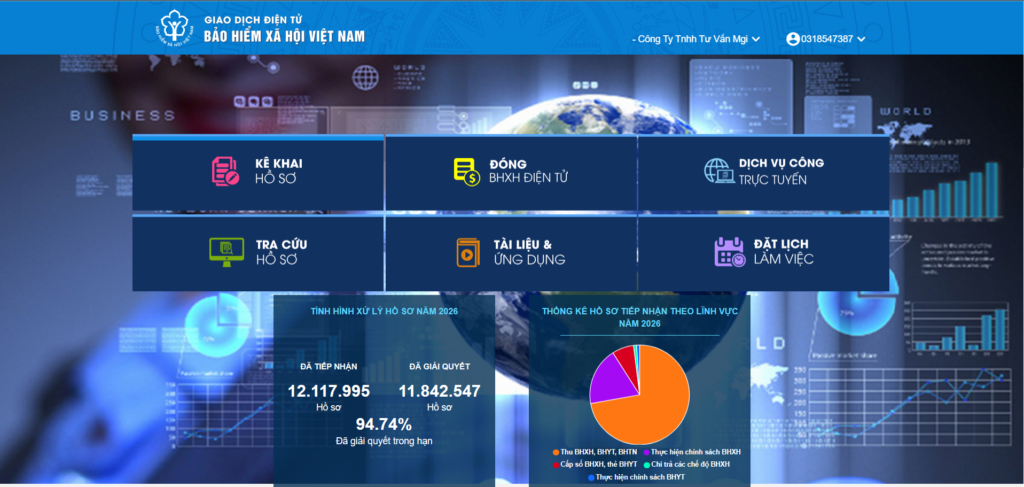
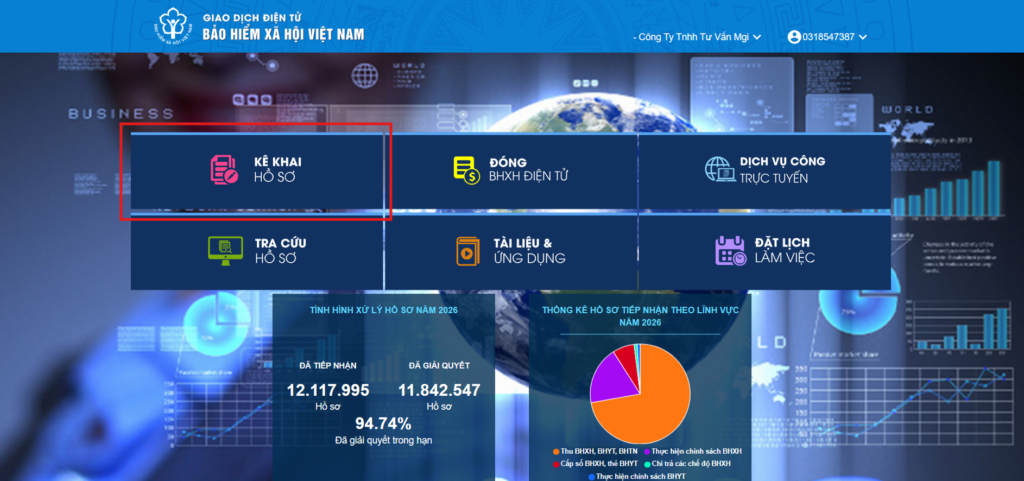
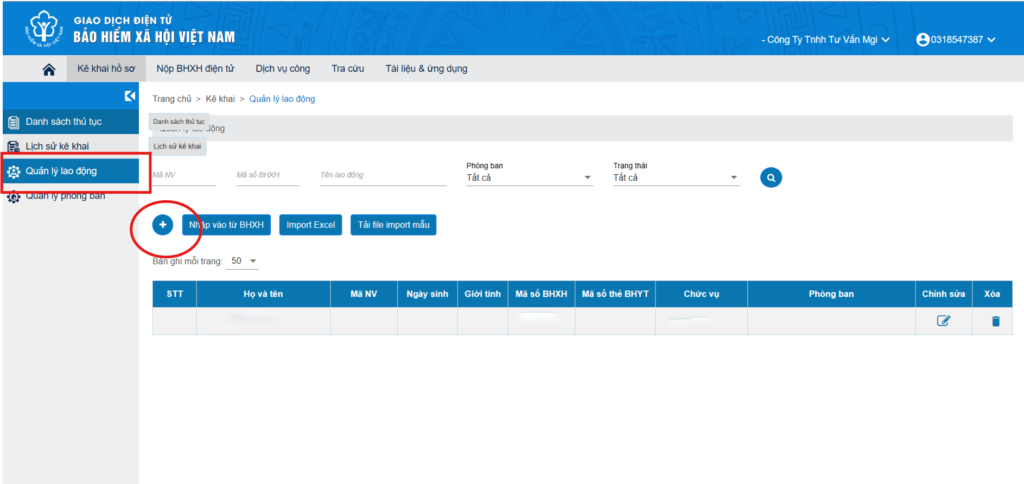
Step 2: After logging into the social insurance software, select “Declare Dossier”
Step 3: Then select “Employee Management” and click the + sign
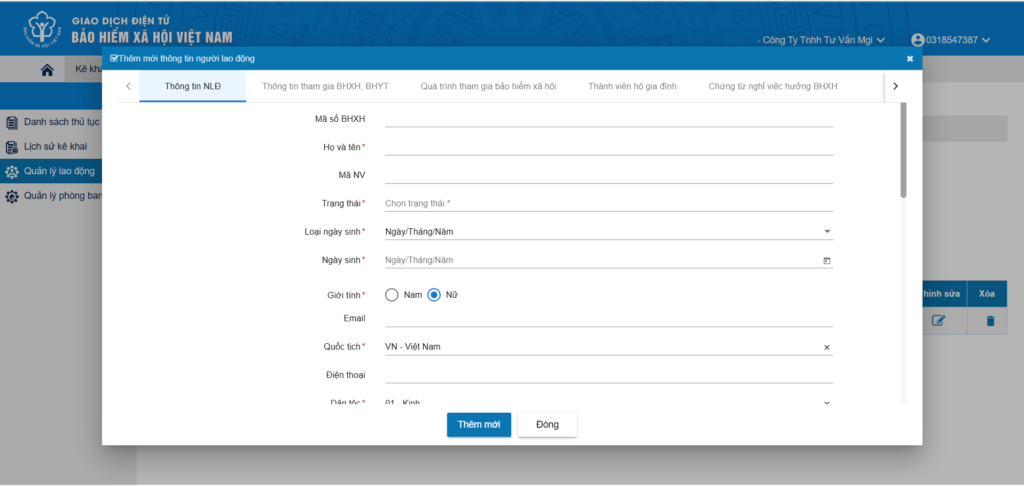
Step 4: Fill in all information marked with an asterisk (*)
After entering the information, click “Add New”
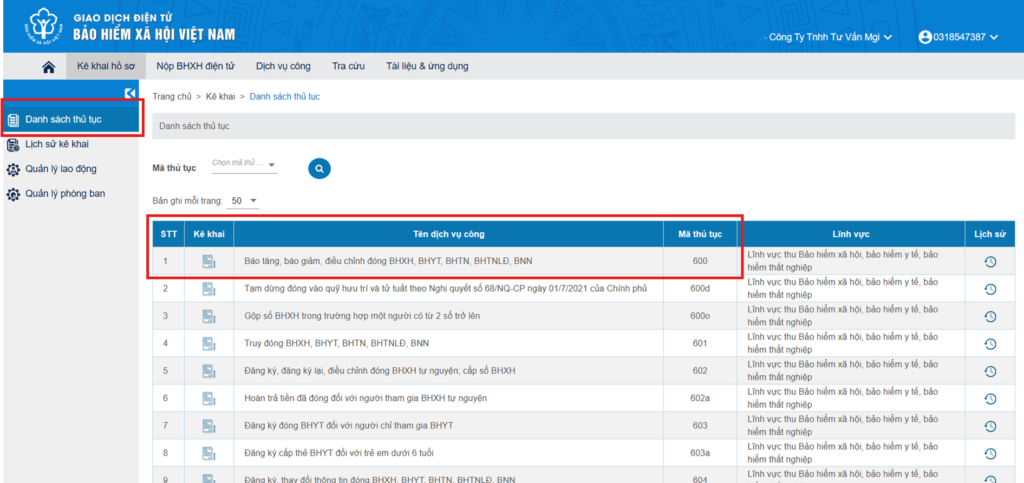
Step 5: Then select the List of Procedures
Select procedure 600: to carry out the increase in employees.
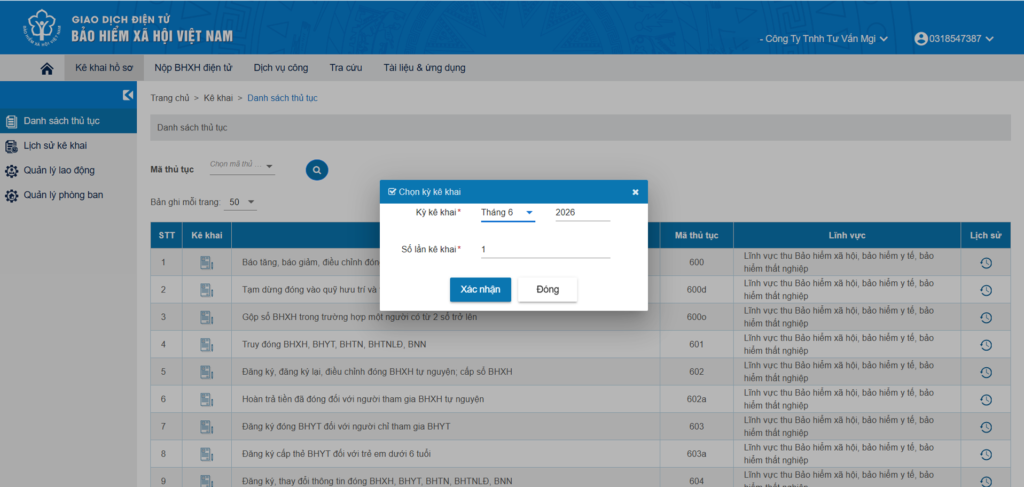
Step 6: Select the “Declaration Period”
- The system automatically displays the current month and year; the declaration count is automatically numbered from 01 to 99.
- You are allowed to adjust the declaration period if that period does not yet exist in the system and does not exceed the most recent declaration.
- Select “Confirm” to move to the declaration screen.
Step 7: Select the employees and classify the declaration
Select “Select Employees” to display the list;
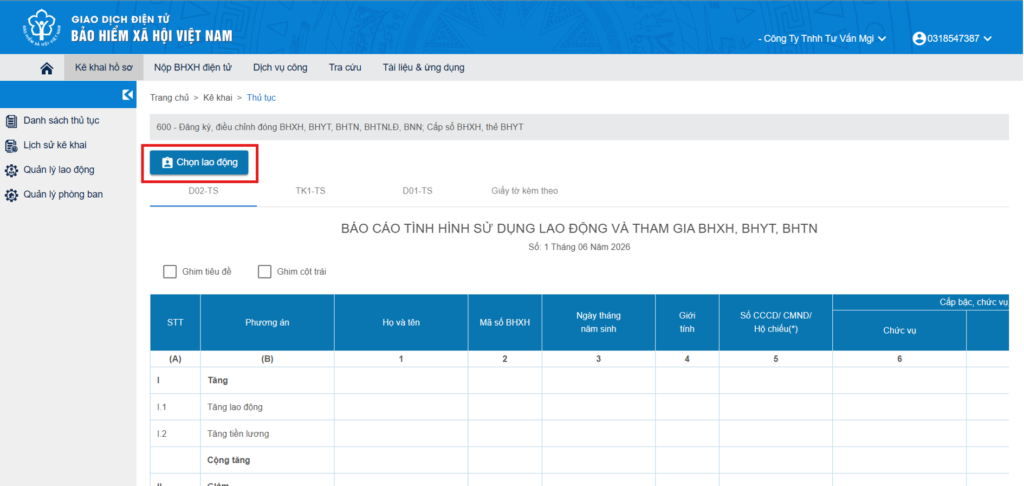
Tick the employees to be declared.
Then select “Increase Employees”
Select “Apply” to carry out the declaration.
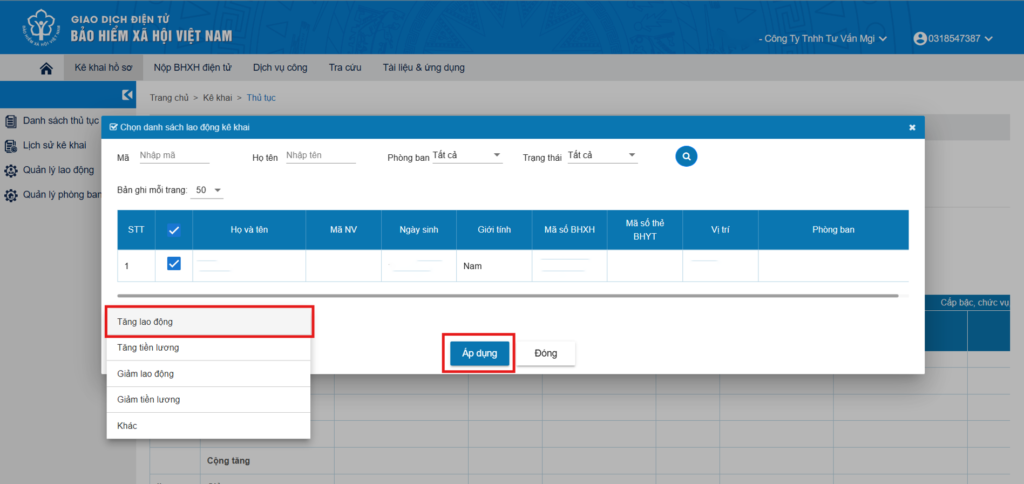
Step 8: Enter the dossier information
- Form D02-TS: Enter all required information such as: the plan, full name, social insurance number, job title, position, salary level, type and validity of the contract, and other related information such as the contract number.
- Form TK1-TS: Enter personal information such as: full name, date of birth, nationality, ethnicity, place of birth registration, address, and any additional information (if any).
- Form D01-TS: For the company (declared only if the company reports an increase for the first time or there are changes to the unit’s information).
Select “Save” to temporarily save the dossier.
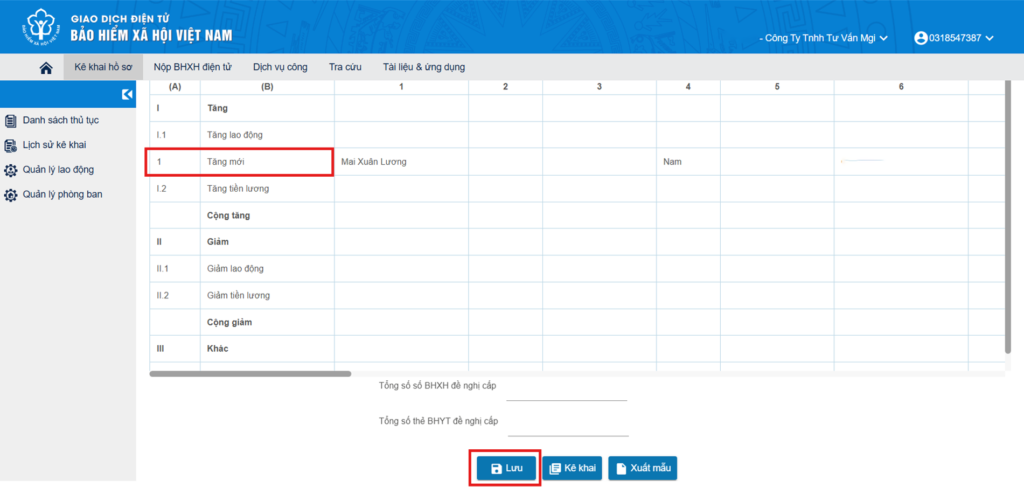
Step 9: Check the information
Select “Declare” to check the data and complete the preparation for submitting the dossier. The system will issue a notice if the data is incomplete or incorrect.
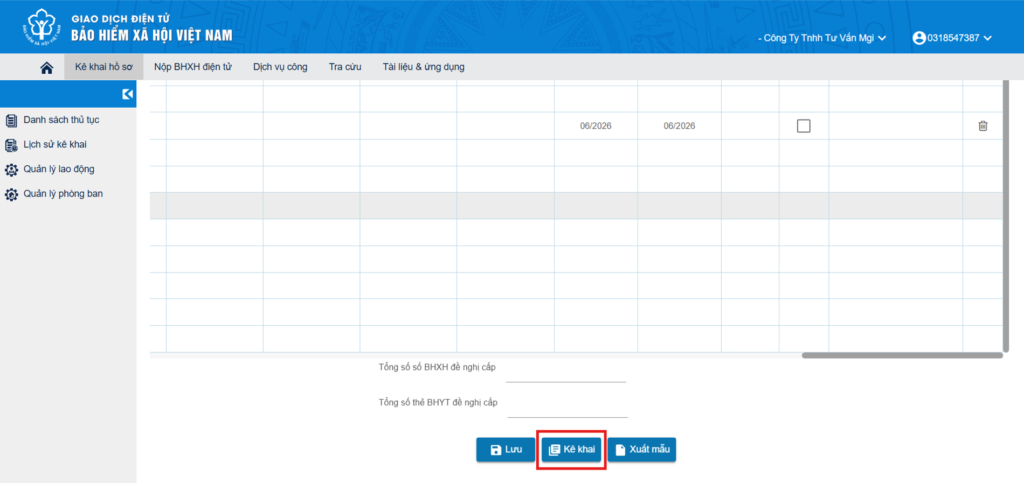
Step 10: Once there is no more information to add, the system shows “Confirm” and moves to the digital signing and submission step.
General note: The dossier is only received by the system when it is fully and validly declared and validly digitally signed as required.
Frequently Asked Questions (FAQ) on Reporting an SI Increase on the Public Service Portal
While advising and supporting clients on the procedure for reporting an increase in social insurance participants, MGI has compiled the most common questions below:
1. Within how long from the date of signing the contract must a business report an SI increase for an employee?
Under the Law on Social Insurance 2024, within 30 days from the date the employee becomes subject to compulsory social insurance (specifically: the date the labor contract takes effect), the business must submit the increase-reporting dossier to the social insurance authority.
2. Does an employee returning from maternity leave or long-term sick leave need to be reported as an increase?
Yes. The business must carry out the increase-reporting procedure again for an employee who returns to work after maternity leave, sick leave, or unpaid leave/contract suspension of 14 days or more.
3. What exactly is the compulsory SI contribution rate applied from 2026?
Under Article 32 of the Law on Social Insurance 2024, the total compulsory SI contribution rate into the funds is 25% of the salary used as the contribution basis, comprising:
- Sickness and maternity fund: 3%.
- Retirement and survivorship fund: 22%.
(Note: This rate does not include the Health Insurance and Unemployment Insurance contributions under other relevant regulations.)
4. Which form is needed when reporting an increase for a new employee who does not yet have a social insurance number?
For a new employee who does not yet have a social insurance number (or needs to adjust their personal information), the business must ask the employee to complete the Participation Declaration (Form TK1-TS) to enter the information into the system alongside Form D02-TS (List of newly added employees).
5. Why does the system report an error or not allow the dossier to be submitted?
The Social Insurance Public Service Portal only accepts a dossier when the business meets 3 conditions: all required information is fully declared, the information is valid (no error warnings from the system), and the dossier is validly digitally signed with the business’s digital signature.
6. Can a business adjust the “Declaration Period” on the system itself?
Yes. The system automatically displays the current month/year, but the business is allowed to adjust the declaration period provided that period does not yet exist in the system and does not exceed the most recent declaration.